9D Breathwork on ZOOM!
Experience the power of your breath in the
comfort of your home
Sessions Available
ZOOM - STRESS & ANXIETY
Sunday July 19, 7:00-8:30 PM
Registration required - Space is limited
Who is this for?
This experience is perfectly tailored for those struggling with stress and anxiety. It's an optimal first-time journey for individuals with contraindications or for those looking to integrate after a more intensive somatic journey. This offers a gentle escape from anxiety, introducing tranquility and balance. By partaking, participants can ease into the realm of breathwork, fostering a restful connection with their inner calm.
Journey Summary:
Strap in and prepare for the Stress Relief Sojourn, a targeted breathwork experience meticulously crafted to guide you towards serene tranquility. This journey navigates you through the rough waters of anxiety, liberating you from the tight grip of day-to-day tensions. Incorporating deep belly breathing, coherent breathing, box breathing, and the 4:2:6 method, it blends a harmonious rhythm of relaxation techniques. And for a hint of invigoration, the infinity breathing technique provides a subtle activation, allowing you to gently explore the sensation of energizing your system.
Centered around the themes of calm, centeredness, clarity, and serenity, this expedition fosters a profound personal retreat. You'll shed the weight of accumulated stress, making way for mental clarity, peaceful repose, and rejuvenated balance. This soothing voyage serves as a foundation for continued mental wellness and resilience, bolstering the revelation of your calmest self. Embrace the embrace of quietude, enhancing your life with a renewed sense of peace and boundless tranquility.
Common Outcomes:
Relief from Overwhelm: Experience a profound calmness as you distance yourself from the pressures of daily life, alleviating the stressors that have kept you on edge.
Release of Mental Tensions: Dissolve both mental and physical anxieties, ushering in a wave of relief and restful ease.
Cultivation of Calm, Clarity, and Serenity: Develop a peaceful and clear relationship with yourself and your surroundings, utilizing moments of tranquility as stepping stones towards a serene existence.
Stability and Mental Poise: Nurture an inner composure and mental steadiness, preparing you to navigate life's challenges with clarity and balance.
Tranquility and Restored Balance: Immerse yourself in a deep sense of peace and well-being, establishing equilibrium in both mind and spirit.
Revitalized Sense of Peace: Welcome a renewed sense of inner calm and relaxation, setting the stage for a life filled with ease and harmonious existence.
DURATION: 1:07:13
Important Things To Do Prior to Your Session
for a successful journey
How to Set Up Your Computer and
Space for a 9D Zoom Breathwork Class
You can use your phone but a laptop may have better sound
Earbuds or headphones are highly recommended
NOTE: If it’s your first time doing a Live Online Breathwork Class, don’t wait until the time the class is scheduled to read these instructions. If you do, you’ll be late and miss important information you need to do the breathing technique correctly.
Sign into the zoom class at least 15 minutes early (don’t wait until the last minute- you may have technical difficulties or experience trouble logging on).
Set up your computer so that it’s next to your space. Headphones or ear pods are ideal and provide the best 9D experience. For the best experience please make sure that you are in a room with the best Internet connection speeds (close to your WiFi router).
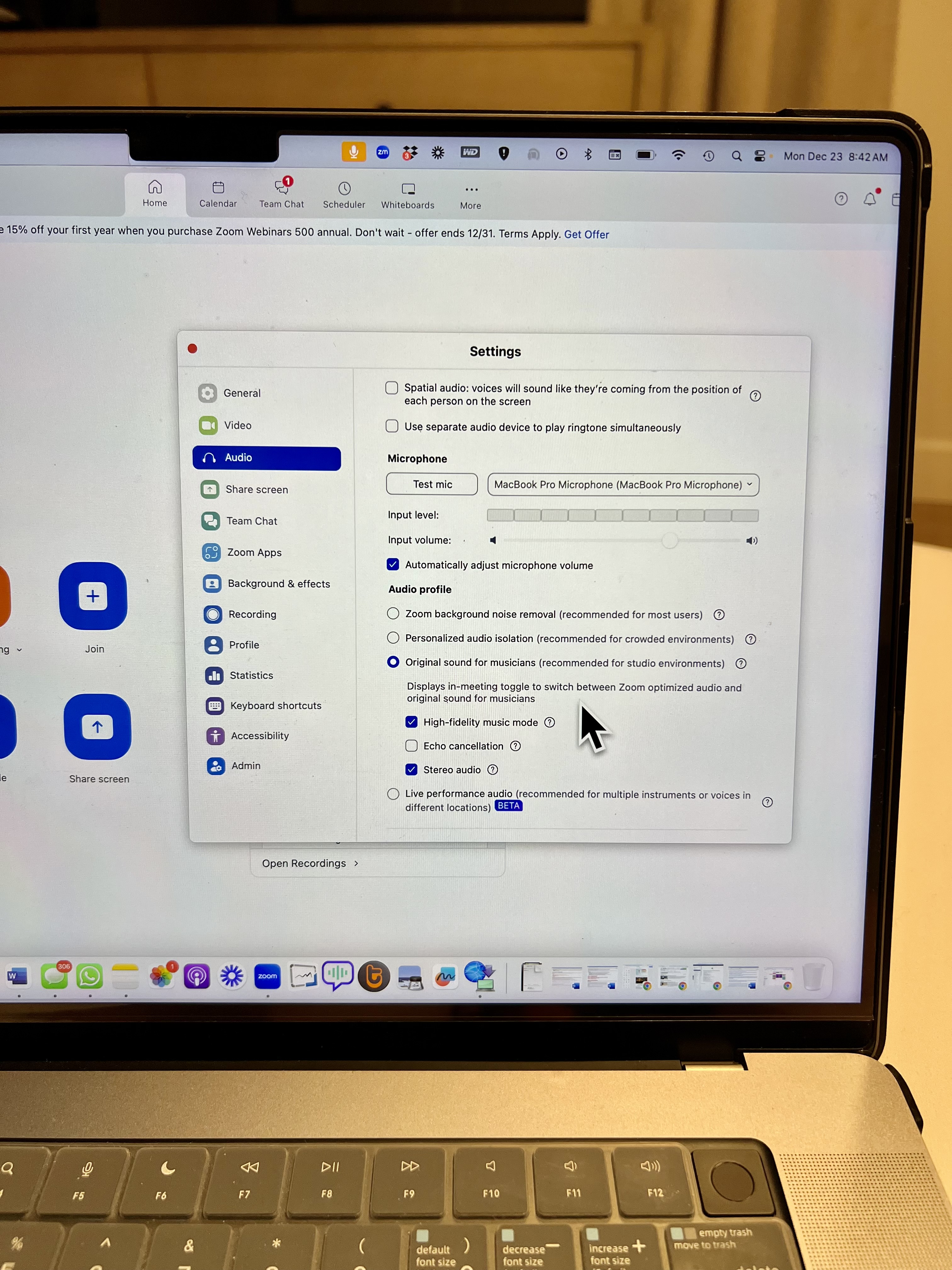
Access Audio Settings:
•Once you're in Zoom, look for the microphone icon in the lower-left corner of the Zoom window.
• Click the microphone icon, and select Audio Settings.
• Check Enable Original Sound
• This will allow you to hear the sound in its original, unaltered form.
• Check High-Fidelity music mode
•Uncheck the Echo Cancellation box. This is essential to prevent distortion and ensure that the sound remains clear, especially when using binaural beats.
• Check the Stereo Audio box for the best listening experience. This will ensure you can hear the binaural beats properly, with the sound moving from side to side.
By following these steps, you'll create the optimal listening environment for your session. Enjoy the experience!
Comfort is Key
Create a Quiet and Distraction-Free Environment:
Find a space where you can be undisturbed throughout the session. Ideally, this should be a room free from distractions such as children, pets, or family members.
Turn off any notifications on your phone or other devices.
You will need a comfortable place to lay down during the session, such as a bed, yoga mat, sofa, or any soft surface. Make sure that you can fully relax and remain comfortable for the duration of the journey.
A bolster or small pillow may be nice
Blanket as you may get cold
Consider Sound:
Solo Practice: For the best sound experience, use a good quality set of headphones. This will allow you to immerse yourself in the soundscapes and binaural beats. Noise cancelling headphones are ideal.
If you have a pet, make sure they are not in the room with you as they will either want to comfort you or they will get scared.
Additional Comfort Items:
An eye mask is a great addition to help you fully relax and block out light, creating a deeper experience. If you have one, be sure to use it during the session.
In some journeys we will invite you to scream. I invite you to use a "scream pillow" if you have other people in the house or you are in a downtown area or have neighbors close.
Avoid Heavy Meals:
Try not to eat any heavy meals for at least 4 hours before the session. This will allow your body to focus its energy on the Breathwork rather than digesting food, which can help you go deeper into the experience.
Prepare for Post-Journey Integration:
After the session, you may feel a sense of calm, clarity, or deep emotion. We will do a brief check in after the session.
It's important to allow yourself some time to integrate the experience. Plan to avoid jumping into major tasks, meetings, or responsibilities immediately afterward. Give yourself at least one hour to process and reflect.
By following these simple steps, you will set yourself up for a transformative and enriching Breathwork journey.
Take a breather with us: Join the Pause Breathe Proceed Community
Copyright © 2018 PAUSE BREATHE PROCEED | All Rights Reserved |Privacy Policy|Terms and Conditions
Please note that Pause Breathe Proceed - is copyrighted material and is for your personal use only.
No portion may be used for any other purpose without written permission of the publisher.
Site Designed By Us for You!
Instagram
LinkedIn
Youtube
TikTok